
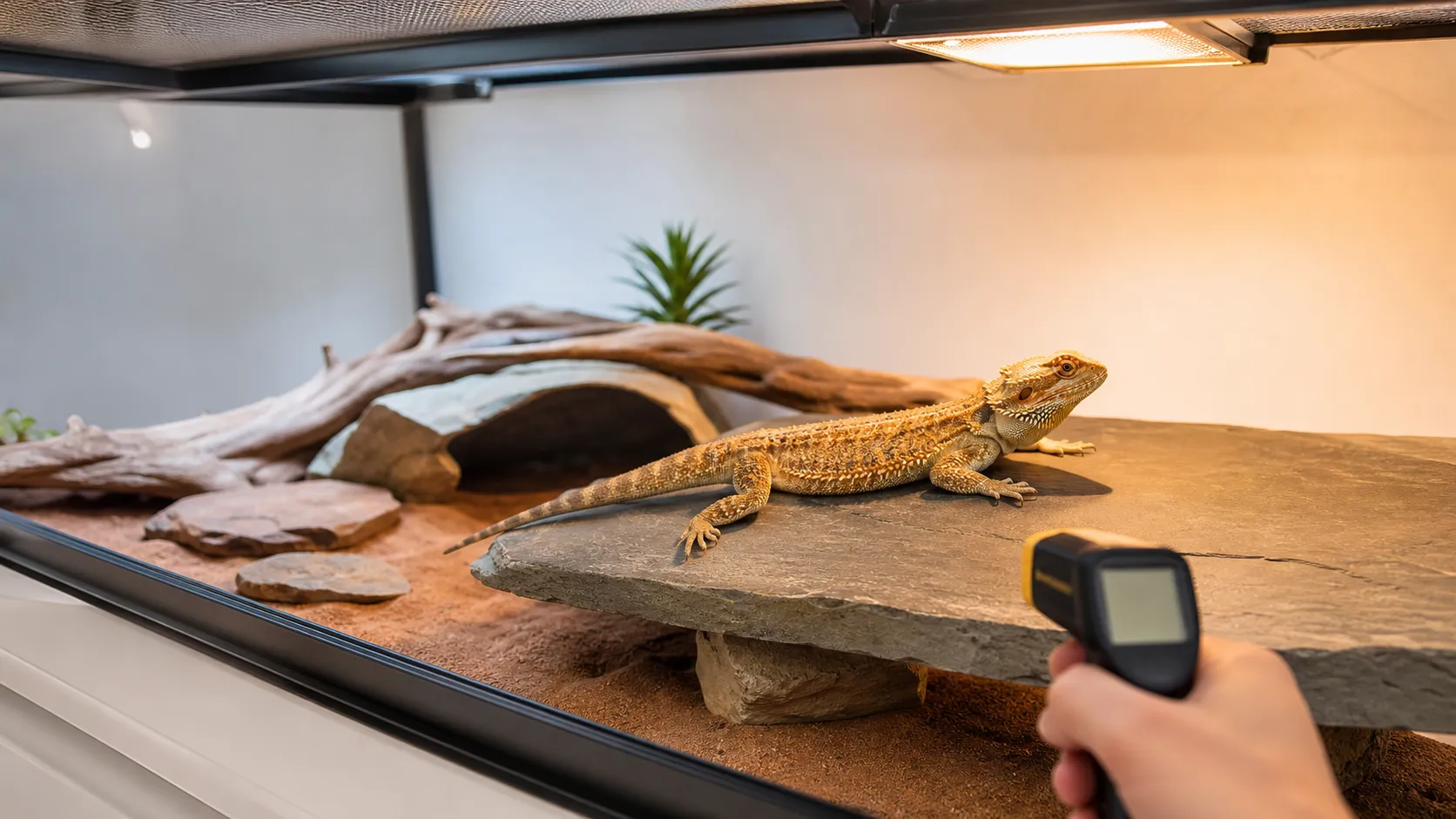

 Published sources
 Product details checked
A basking spot can be too hot even when the thermostat display looks normal. It can also be too cold when the warm-side air seems acceptable. The usual reason is simple: the dragon is warmed by the surface it touches, by the surrounding air, and by radiant heat from above, while many keepers check only one of those three.
Quick answer: measure the basking surface with an infrared thermometer, measure warm- and cool-side air with separate digital probes, and use a thermostat that matches the heater and its control method. The RSPCA bearded dragon guide uses roughly 100–108°F (38–42°C) for the hot basking end and 72–79°F (22–26°C) for the cool end. Other specialist guides use a higher basking-surface range, so do not average conflicting numbers. Choose one current care plan, measure the same way every time, and preserve a real cool retreat.
This guide focuses on heat and measurement.
In this guide, you’ll learn:
- Which number belongs to the basking surface, warm-side air, and cool-side air
- How to tell whether a reading is too hot, too cold, or simply taken at the wrong point
- What to adjust first when the basking spot misses the target
- How a thermostat probe, infrared thermometer, and ambient probes work together
- When a hot or cold setup is a genuine safety problem rather than a small tuning issue
Temperature tools for diagnosing the problem
These products solve different measurement or control problems.
Match the tool to the measurement
-
Etekcity Lasergrip 774 Infrared Thermometer
Etekcity
Non-contact infrared thermometer with laser targeting, adjustable emissivity, and a 12:1 distance-to-spot ratio.
- Reads surface temperature quickly without moving hides or touching the reptile
- 12:1 distance-to-spot ratio is practical for a terrarium
- Adjustable emissivity improves readings across slate, glass, and other surfaces
- Best use
- Calibrating basking and cool-side surface temperatures
-
Veanic 2-Pack Mini Digital Thermometer/Hygrometer with Probe
Veanic
Two compact digital thermometer/hygrometer displays with external probes for comparing separate enclosure zones without using the thermostat display as the only reading.
- Two displays make warm-side and cool-side placement practical
- External probe reports temperature and humidity at the chosen location
- the product documentation specifies a -58°F to 158°F temperature range
- Best use
- Independent warm- and cool-side ambient checks on a small budget
-
Exo Terra PT2461 300W Dimming & Pulse Proportional Thermostat
Exo Terra
A North American 300W dimming and pulse proportional thermostat with a waterproof remote probe for a single carefully matched reptile heat source.
- Selectable dimming and pulse proportional modes
- Waterproof remote temperature probe
- Supports heat mats, heat cables, ceramic heaters, and incandescent bulbs according to the product documentation
- Best use
- One compatible lamp, DHP, CHE, or mat when selectable proportional modes are useful
-
REPTI ZOO 75W Intense Basking Spot Heat Lamp Bulbs (2-Pack)
REPTI ZOO
A two-pack of 75W visible-heat basking bulbs for daytime overhead heating when paired with a suitable dimming thermostat and UVB system.
- Two 75W basking bulbs provide a ready replacement
- Bright visible light suits a daytime basking schedule
- Best use
- Budget daytime basking with a spare bulb
Review the linked product page before purchasing.
First, separate surface temperature from air temperature
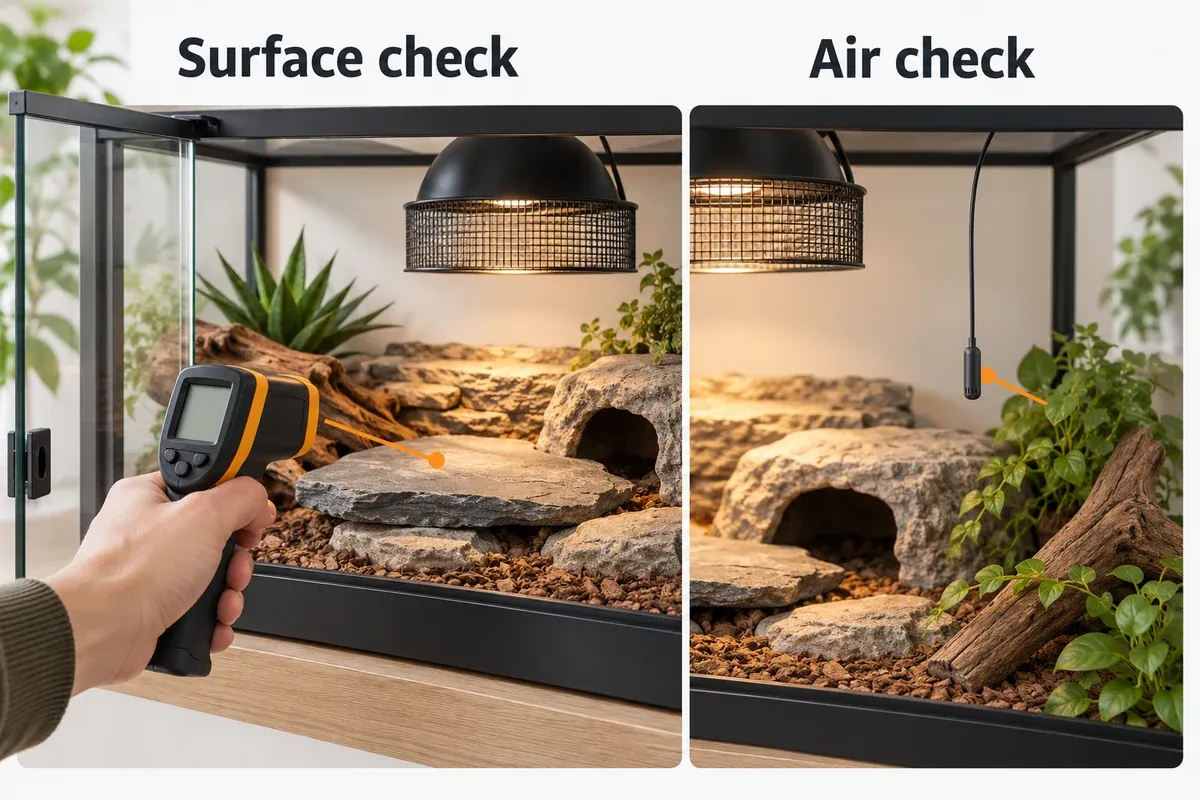
The phrase “basking temperature” is incomplete unless you say what was measured and where. A laser thermometer pointed at a slate ledge measures a surface. A probe hanging in the air measures ambient air. A thermostat measures the location of its own sensor and then changes the connected heater around that reading.
The Merck Veterinary Manual’s reptile husbandry guidance recommends thermostat-controlled, screened heaters positioned toward one end of the enclosure so the reptile can move across a thermal gradient. Its temperature table also distinguishes air gradients from basking temperatures. That distinction is why one “correct” display number is not enough.
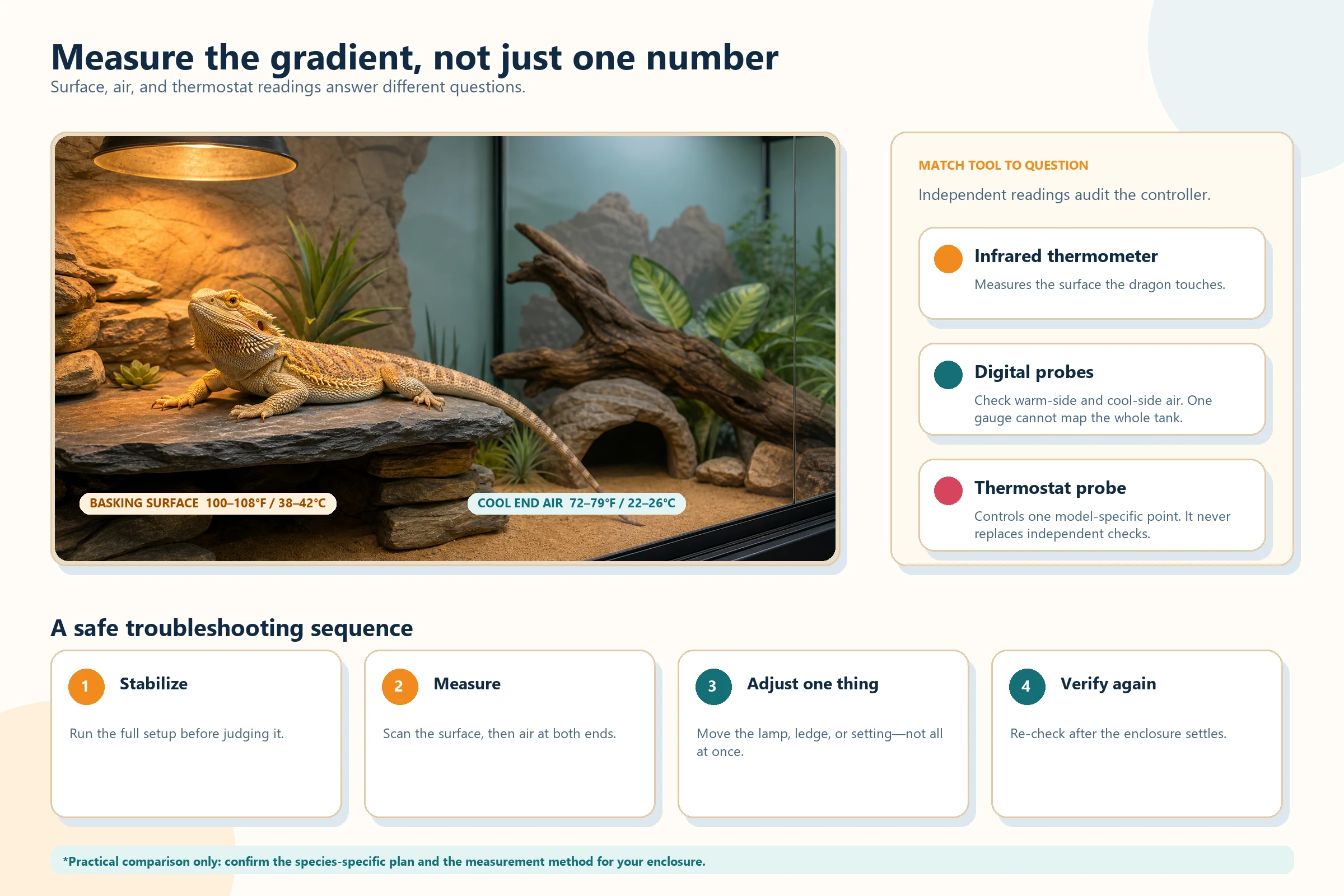
The surface is the contact temperature. The probes describe the air at their exact locations. The thermostat controls only the point specified by its manual.
Practical reference ranges
Use a current species-specific plan or your exotics veterinarian’s instructions for the final target. The values below are a practical starting comparison, not a promise that every age, enclosure, lamp, or measurement method will use the same number.
| Measurement point | RSPCA reference | What it tells you |
|---|---|---|
| Basking zone / hot end | 100–108°F (38–42°C) | The warmest usable area under the heat source |
| Cool end | 72–79°F (22–26°C) | The retreat that lets the dragon cool down |
| Night air | Do not let the enclosure fall below about 68–72°F (20–22°C) without a reasoned, safely controlled plan | Whether supplemental, lightless heat may be needed in a cold room |
The specialist ReptiFiles temperature guide gives 108–113°F (42–45°C) for basking surface temperature and 77–85°F (25–29°C) for the cool-side surface. That higher range is not a reason to turn up a lamp blindly. It shows why the source, the animal’s age and health, and the measurement point should be recorded together. ReptiFiles also warns that a basking surface does not need to exceed 122°F (50°C), because that can overheat the enclosure.
The most useful rule is therefore: pick a reputable care reference, measure the same surface and air points consistently, and keep the cool end genuinely usable.
A ten-minute temperature check
Do this before changing wattage or buying another heater. A wrong measurement can send the entire setup in the wrong direction.
1. Let the enclosure reach a stable daytime state
Turn on the normal daytime heating and lighting schedule. Wait until the basking platform and enclosure have warmed fully rather than checking immediately after a bulb starts. The specialist ReptiFiles guide suggests allowing about three hours before taking the final surface reading; for a major change, run the complete setup through a full day/night cycle before you treat the result as stable.
Keep the dragon’s routine calm. Take a quick surface scan before it settles on the ledge, and do not move a basking animal repeatedly just to collect more numbers.
2. Scan the entire basking surface
Point the infrared thermometer at the slate, rock, branch, or ledge where the dragon’s back actually rests. Check the center, both edges, the highest accessible point, and any lower route into the area. A small, very hot center can be more important than an average reading that looks acceptable.
Do not aim an infrared thermometer through glass and assume you measured the rock behind it. Hold the tool at a useful distance for its distance-to-spot ratio, keep the target in the sensor’s field, and avoid aiming at the dragon’s eyes. Reflective or glossy surfaces can also produce less reliable readings than a matte stone or a small piece of matte temperature-resistant tape placed according to the thermometer manufacturer’s instructions.
Check current price on Amazon →3. Measure air in the warm and cool zones
Use one digital probe in shaded warm-side air and another in shaded cool-side air. Keep the probes out of the direct beam if your goal is air temperature; a probe hanging in the lamp’s radiation can report a mixed radiant-and-air result. Place each probe at the height the dragon occupies, not pressed against a wall or hidden under a decoration.
The Veanic 2-Pack Mini Digital Thermometer/Hygrometer is useful for this two-zone check because it gives you two displays with external probes. the product documentation states ±2°F temperature accuracy and ±5%RH humidity accuracy, and it says the probes are not water-resistant.
Use this kind of monitor to compare zones and watch trends, not as a laboratory calibration instrument. It cannot replace the infrared surface check, and its humidity number describes the probe’s location rather than the entire enclosure.
Check current price on Amazon →4. Record the thermostat probe separately
Write down what the thermostat display says and exactly where its probe is mounted. The thermostat may be regulating a surface, a warm hide, or suspended air beside an overhead heater depending on the controller. The display is not a second independent thermometer if it is reporting the same sensor that controls the heater.
If the thermostat reading looks safe but the basking surface is far too hot or cold, inspect the probe position, controller mode, and connection before changing the target. The reptile thermostat probe-placement guide explains why a surface-control instruction from one model cannot automatically be copied to another model.
Read the pattern before you adjust anything
Temperature troubleshooting becomes much easier when you compare all four points: basking surface, warm-side air, cool-side air, and thermostat probe.
The surface is too hot, but the air looks acceptable
This is the classic hidden hotspot. A dark slate, a high branch, or a narrow focused beam can become much hotter than the air around it. A thermostat probe that is off to the side may never see the peak the dragon can touch.
Do this:
- Turn the heat source off while you inspect an extreme reading. Do not leave a surface above your care plan running while you search for a better number.
- Scan the whole ledge again and confirm that the reading was not taken through glass or on a different surface.
- Check whether the platform is too close to the bulb or whether the lamp is creating a tiny, intense spot.
- Increase the lamp-to-surface distance only within the fixture, guard, and manufacturer’s safe-clearance requirements, or lower the output with a compatible dimming thermostat.
- Re-check the hottest accessible point and the cool end after the enclosure settles.
Do not simply move the thermostat probe farther away to make the display look cooler. That can hide the risk instead of controlling it.
The surface is too cold, but the cool end is fine
The heat source may be too far away, underpowered for the enclosure, partially blocked, or aimed at a surface that does not hold heat well. A low surface number does not automatically mean the whole enclosure needs more heat.
Check the bulb, socket, guard, thermostat output, lamp height, and the actual basking platform. A small change in height or a wider, stable surface can be more useful than immediately jumping to a higher wattage. If the bulb is old, damaged, or failing, replace it with a correctly rated bulb and measure the result rather than trusting the label.
Check current price on Amazon →Both the warm and cool sides are too hot
The enclosure has lost its gradient. Common causes include a lamp that is too strong for the space, a basking platform that spreads heat across too much of the tank, a warm room, blocked ventilation, or a thermostat probe that is sensing a cooler spot than the animal uses.
Reduce the controlled heat output, restore safe ventilation within the enclosure design, and keep the heat source toward one end. Do not cover every vent or add another heater to “balance” a tank whose cool end is already too hot. The Merck Veterinary Manual specifically recommends a gradient and warns that heaters should be screened from the animal.
The warm and cool sides are both too cold
First check whether the heat source is actually operating and whether the room itself is unusually cold. Then inspect the lamp distance, fixture rating, enclosure material, and the size of the ventilation openings. A large enclosure can need a different heat plan than a small starter tank, but the answer is still a measured gradient—not a hotter lamp pointed at one small spot.
If the room becomes cold at night, a lightless supplemental source may be appropriate for the species and enclosure. The RSPCA notes that a safely set-up ceramic heater may be used to maintain nighttime air temperature when needed, but all heat sources still need suitable control, guarding, and independent verification. Visible “night bulbs” are not a substitute for darkness.
The thermostat says “right,” but the readings keep swinging
Look for a loose or moved probe, a thermostat mode that does not match the heater, a cycling visible bulb, a low battery in a thermometer, or a door that is being opened during every measurement. Check cable routing and make sure the probe is not touching the heater, trapped under decor, or accessible for chewing.
For a visible basking bulb, a compatible dimming thermostat usually creates a smoother output than simple on/off switching. Product documentation describes selectable dimming and pulse modes, a waterproof remote probe, and a 300W maximum load.
The important limitation is compatibility. A dimming controller cannot make the wrong bulb, fixture, probe position, or clearance safe. Follow the controller’s North American operating instructions, then verify the finished surface and both ends independently.
Check current price on Amazon →How to fix a basking spot safely
Make one change at a time. Otherwise, you cannot tell whether the improvement came from the lamp height, the platform, the thermostat, or a change in room temperature.
If the basking spot is too hot
- Stop the heater temporarily if the surface is in an extreme or rapidly rising range.
- Confirm the measurement on the actual surface, from outside the enclosure and not through glass.
- Check the highest place the dragon can reach, not only the center of the visible light patch.
- Raise the lamp or lower the controlled output only within the fixture and manufacturer’s safety instructions.
- Use a wider basking area so the dragon can move across a gradual surface rather than being forced onto a tiny hotspot.
- Re-measure the basking surface, warm-side air, cool-side air, and thermostat point after the setup stabilizes.
Do not solve an overheating surface by placing a cold object over the hotspot while leaving the heater unchanged. That can create an unstable surface and a new probe error.
If the basking spot is too cold
- Verify that the bulb is working, the socket is rated for it, and the guard is correctly installed.
- Check the lamp-to-platform distance and whether the platform is below the useful beam.
- Adjust the platform or lamp height in a small, measurable step.
- Replace a failing bulb with a compatible, correctly rated one rather than adding multiple bulbs without a new test.
- Use a compatible dimming controller for a visible lamp when the setup needs output control.
- Keep the cool end from rising with the basking correction; a warm animal still needs somewhere to retreat.
The reptile heat-mat guide explains why a heat mat is not a replacement for an overhead basking gradient. Do not use a heat mat as a shortcut for a cold basking surface unless a reptile veterinarian and the equipment instructions specifically support that arrangement.
If the cool end is not cool enough
Move the heat source toward one end, remove unnecessary radiant heat from the cool side, and check whether the room or a sunny window is warming the entire enclosure. The RSPCA also recommends positioning the vivarium away from other heat sources such as radiators or bright windows.
Do not cover ventilation until the tank “holds heat.” Reduced airflow can make the cool retreat unusable and can turn a moderate setup into a uniformly hot box.
A repeatable commissioning and maintenance test
Use this checklist after a new setup, a bulb change, a thermostat change, a moved basking ledge, or a major season change:
- Photograph the layout. Include lamp height, guard, basking surface, cool hide, probe positions, and cable routes.
- Run the normal daytime schedule. Let the basking surface and decor reach their stable temperature.
- Measure the surface map. Record the hottest and coolest accessible points on the basking platform.
- Measure the air map. Record shaded warm-side air and shaded cool-side air with independent digital probes.
- Record the thermostat. Note its displayed value, control mode, target, and exact probe location.
- Check the retreat. Confirm that the dragon can leave the basking zone without climbing over a hot guard, cable, or exposed heater.
- Change one variable. Adjust only lamp height, platform position, output, or another single factor.
- Repeat after settling. For a major change, compare morning, midday, late-day, and nighttime readings across a full cycle.
A simple log is more useful than a string of guesses:
| Time | Basking surface | Warm-side air | Cool-side air | Thermostat | Change made |
|---|---|---|---|---|---|
| Before adjustment | |||||
| After stable warm-up | |||||
| Late day | |||||
| After lights out |
If a number changes sharply after the dragon climbs onto the ledge, after a door opens, or when the thermostat dims the lamp, write that down. The pattern often reveals whether you are seeing a true enclosure problem or a measurement artifact.
When the temperature problem is urgent
Treat these as safety issues rather than normal fine-tuning:
- The hottest accessible surface is near or above 122°F (50°C), especially if there is no easy cool retreat.
- The thermostat is stuck on, the probe is loose, or the heater is unguarded and reachable.
- The enclosure cannot maintain a usable cool end even after the heat source is moved to one side.
- A plug, socket, cable, guard, or fixture is damaged, hot in an unexpected place, or showing signs of melting.
- The dragon has a suspected burn, is unable to leave the hot area, or is showing unusual weakness after overheating.
Switch off the questionable heat source while you make the setup safe. If there is a suspected burn or the dragon remains unwell, contact a reptile veterinarian promptly. The Association of Reptile and Amphibian Veterinarians’ resources can help you find a reptile-experienced clinic.
Frequently Asked Questions
Should I measure the rock or the air at the basking spot?
Both. Use an infrared thermometer for the rock, slate, branch, or ledge the dragon touches. Use digital probes for the air in the warm and cool zones. One tool cannot replace the other because surface temperature and air temperature can diverge under overhead radiant heat.
Is 105°F too hot for a bearded dragon basking spot?
Not automatically. 105°F is within the RSPCA’s 100–108°F hot-end reference, but the answer depends on whether 105°F is the surface or the air, where it was measured, how large the usable zone is, and which care plan you are following. A 105°F air reading across the whole enclosure is a different problem from a 105°F slate surface with a comfortable cool retreat.
Why does my thermostat show a lower number than my infrared thermometer?
They may be measuring different things. The thermostat probe may be in shaded air while the infrared thermometer is scanning a radiant surface. The difference can also come from probe placement, surface reflectivity, distance-to-spot ratio, or a controller that regulates an air point rather than the exact basking ledge. Compare the exact sensor locations before changing the set point.
Should I use a higher-wattage bulb when the basking spot is too cold?
Only after checking distance, platform height, fixture rating, room temperature, and thermostat compatibility. A higher wattage can raise the basking surface while also making the cool end unsafe. Change one variable, let the enclosure settle, and re-map all zones.
Can a heat mat fix a cold basking area?
It is not a substitute for a controllable overhead basking gradient. A mat warms from below and can create a contact-burn risk if it is not installed and controlled correctly. Start by fixing the overhead heat source and measuring the surface and air separately; use any supplemental heater only for a clearly defined, species-appropriate purpose.
How often should I recheck the basking temperature?
Check it after every bulb, thermostat, platform, substrate, enclosure, or room-temperature change. A quick scan is also useful when the enclosure has been cleaned or the probe may have moved. Once the setup is stable, keep a periodic log rather than assuming yesterday’s reading still applies after a seasonal change.
Final takeaway
When a bearded dragon basking spot is too hot or too cold, start with a measurement map instead of a new bulb. Scan the surface your dragon touches, measure warm- and cool-side air with independent probes, compare the thermostat’s control point with the equipment manual, and preserve a genuine cool retreat.
If the surface is too hot, reduce or reposition the controlled heat and verify the hottest accessible point. If it is too cold, check distance, platform height, fixture, bulb, and room conditions before increasing wattage. One change at a time—and a full re-check after the enclosure settles—turns a confusing number into a safe, repeatable setup.
Sources and further reading
- RSPCA: How to Care For Your Bearded Dragon
- RSPCA: Bearded Dragon Care Sheet PDF
- Merck Veterinary Manual: Management and Husbandry of Reptiles
- UC Davis School of Veterinary Medicine: Bearded Dragon Care
- ReptiFiles: Bearded Dragon Temperatures & UVB Requirements
- Exo Terra: On/Off, Dimming or Pulse Proportional?
- Exo Terra: PT2461 North American operating instructions