

 Published sources
 Product details checked
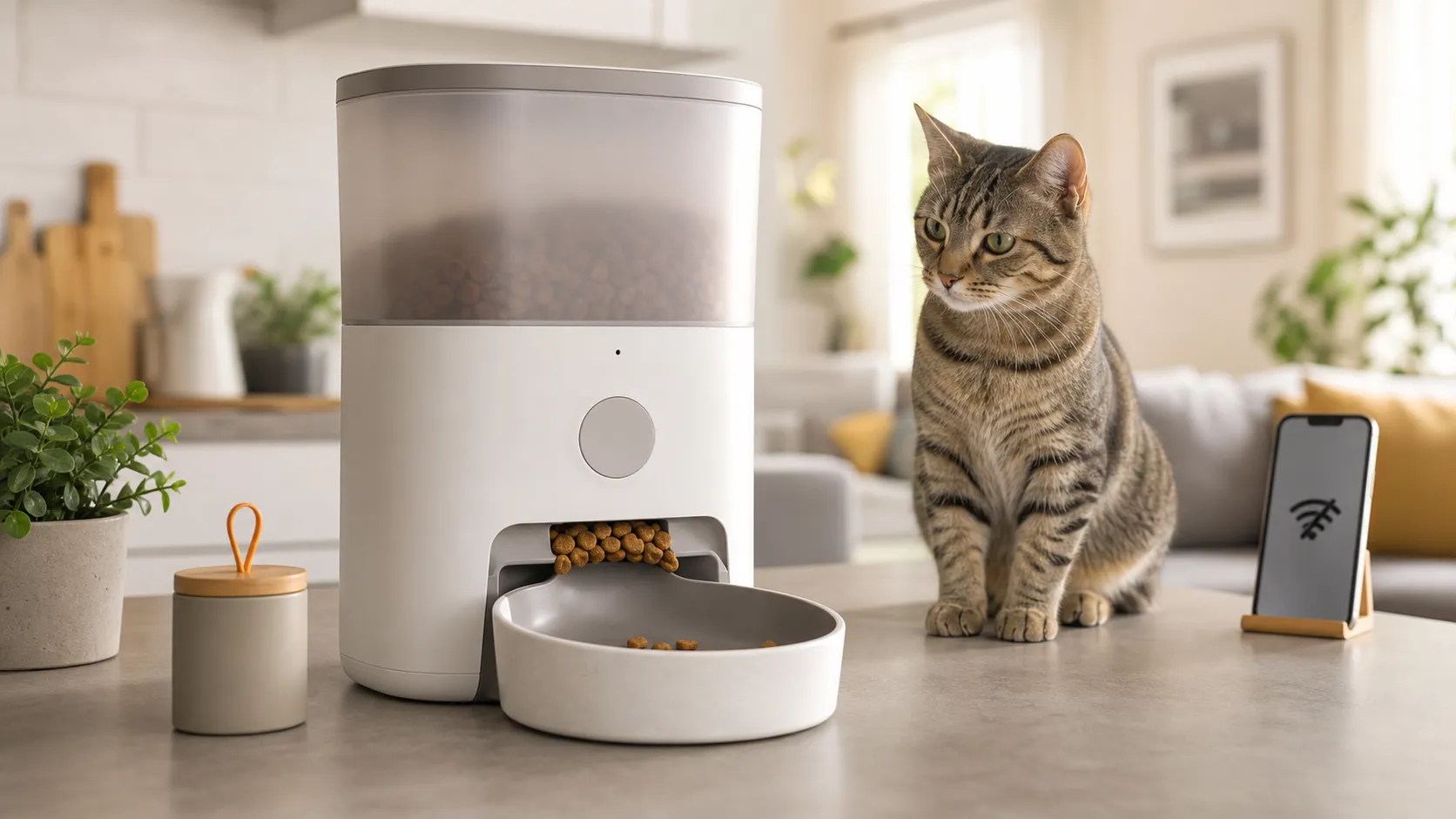
An automatic cat feeder can look completely normal while your cat waits beside an empty bowl. The display may be lit, the app may show a scheduled meal, and the hopper may still be full. In many cases, the failure is a small bridge of kibble above the outlet rather than a dead motor.
Quick answer: Give your cat a meal another way first, then unplug the feeder, empty the hopper, check the food against the model’s instructions, clear the accessible outlet or rotor, and run a supervised manual-feed test. If the motor stays silent, makes a grinding sound, smells hot, or the cord is damaged, stop testing and contact the manufacturer. Restore the app and schedule only after the feeder can dispense a small test portion locally.
This is a brand-agnostic troubleshooting guide, not a hands-on review of every model. Exact food limits, reset sequences, light codes, and Wi-Fi requirements vary by model, so the manual for your feeder takes priority.
In this guide, you will learn:
- How to tell a food jam from a power, motor, schedule, or Wi-Fi problem
- Which checks are safe to do at home and which symptoms mean you should stop
- Why kibble size, moisture, food shape, and a crowded outlet matter
- How to test a feeder before trusting it with an unattended meal
- When a model-specific power adaptor or a replacement feeder makes sense
Quick diagnosis: what the symptom tells you
Start with the symptom you can reproduce. The table is a triage guide, not a substitute for the instructions for your model.
| What you see | Most likely first checks | What the result means |
|---|---|---|
| No display, light, or sound | Outlet, adapter seating, battery contacts, fresh batteries | The feeder may not be receiving power at all. |
| Feeder is on, but no food reaches the bowl | Hopper level, food size, outlet, rotor, portion setting | A bridge, blocked chute, or zero/paused portion is common. |
| Motor hums or clicks, but food does not move | Empty the hopper and inspect the outlet and rotor | The motor may be turning against a jam rather than failing. |
| Manual Feed is silent | Power, control lock, error state, motor, or gear | If a clean manual test cannot move the mechanism, support is safer than repeated tests. |
| One meal is small or inconsistent | Food shape, settling, bridging, bowl position, portion calibration | Measure several actual portions; one first load is not enough to judge accuracy. |
| Scheduled meal is missed, but Manual Feed works | Clock, time zone, schedule, pause, battery backup, app settings | The dispensing mechanism is probably able to work locally. |
| App says offline, but the local button works | Router band, distance, power mode, app pairing | Wi-Fi can be broken while the food path is fine. |
Do this first: a safe five-minute reset
- Feed your cat now. Use a clean bowl or another working feeder. Do not let a cat wait for an app notification while you troubleshoot.
- Keep the cat away from the mechanism. Stop the schedule if your manual allows it, unplug the feeder, and remove batteries only when the model’s instructions say to do so. Never put fingers, a knife, or a screwdriver into a powered food path.
- Empty the hopper and bowl. Look for compacted kibble, crumbs, oily residue, or food that has absorbed moisture. A dry-food hopper is not a safe place for wet food unless the manufacturer explicitly says it is.
- Check the approved food range. Do not assume that “small kibble” means the same thing for every feeder. PetSafe’s FlexFeed instructions list dry kibble between 5 and 12 mm, while PETLIBRO and WOpet guides list model-specific ranges that commonly include 2–15 mm. The exact manual wins.
- Clear only the accessible parts. Use a dry, soft brush or the cleaning method in the manual to remove crumbs from the outlet, rotor cover, conveyor, or crumb catcher. Keep water, oil, and loose tools away from the powered base.
- Reassemble before testing. A lid, hopper, bowl, rotor cover, or conveyor that is slightly out of position can stop a safety interlock or change the portion path.
- Run a small Manual Feed test. Watch the outlet and bowl. Repeat three to five times with a small amount of approved dry food before returning to the normal schedule.
PetSafe’s FlexFeed troubleshooting instructions follow the same useful order: verify power, try batteries, check the food, clear a jam, prime the dispenser, and test a feed. The PETLIBRO Granary guide likewise calls out the tank, outlet, rotor, schedule, and anti-clog parts rather than treating every failure as a motor replacement.
Why the feeder jams: kibble, bridging, and the rotor
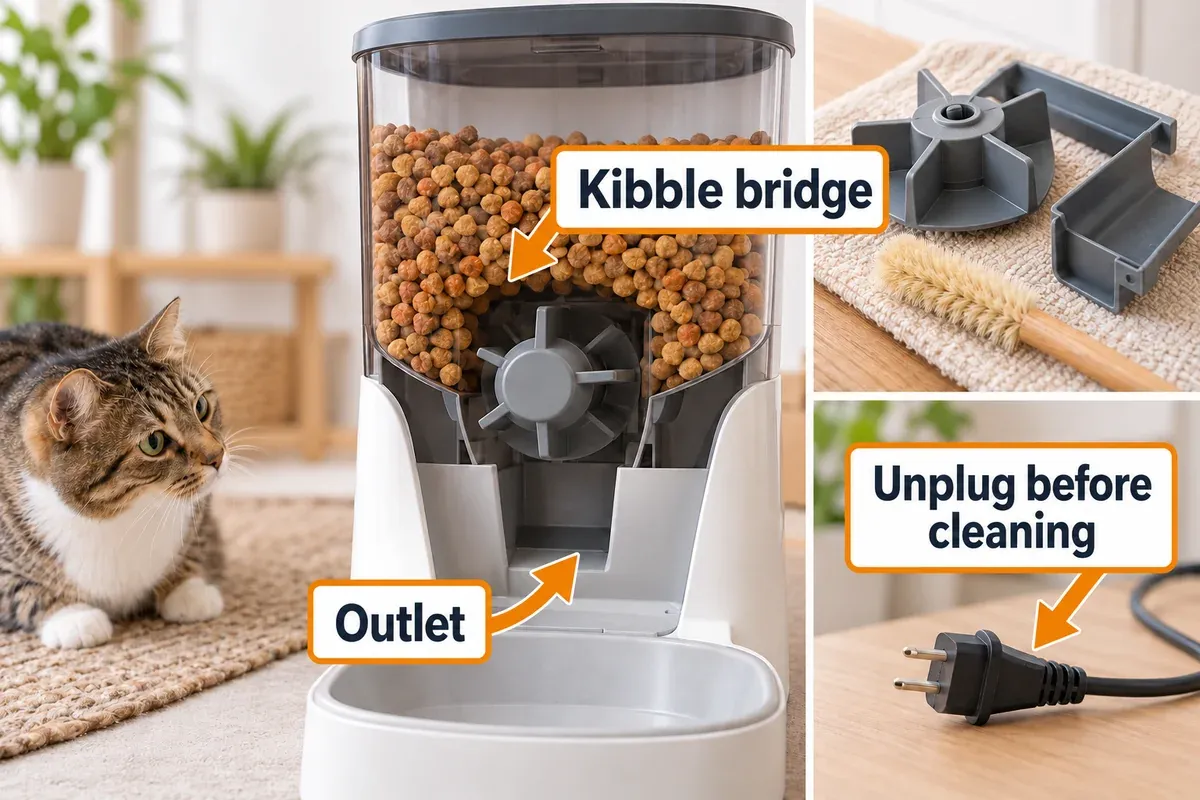
The most common mechanical failure is not a completely blocked tube. It is a “bridge”: pieces of kibble support one another above the dispensing wheel, so the hopper looks full while no food falls into the rotor. Round, large, oily, soft, or irregular pieces can bridge more easily than small, dry pieces. Dust and crumbs can also make a rotor sticky.
Use the feeder’s described food size as a hard limit. A portion can fit through the opening and still fail because the pieces do not tumble reliably. Do not crush food into powder to force it through; the dust can make the next jam worse. If you are changing food, change one variable at a time: use a small amount of the approved dry kibble, run several manual portions, and observe whether the outlet clears itself.
If the feeder has a removable rotor or outlet cover, inspect it for a deformed silicone vane, a lodged piece, or a cover that is not seated. PETLIBRO’s Space feeder instructions recommend a manual-feed test with the tank removed, followed by cleaning the rotor cover and silicone vane when the motor runs but food does not dispense. WOpet’s Smart Pace guide also points to kibble size, an empty bin, an overfilled bowl, and a blocked rotor as separate checks.
Do not lubricate a food path unless the manufacturer specifically tells you to. Oil attracts dust and can contaminate food. Do not pour water into the hopper or base. Wash only the parts that the manual identifies as removable, and let them dry fully before reassembly.
Motor and gear troubleshooting
The Manual Feed button is the cleanest diagnostic split:
- The motor runs and food moves after clearing the outlet: the motor is probably usable; investigate food shape, filling level, bowl placement, and portion settings.
- The motor runs but the rotor does not move: stop after a short test and inspect the rotor, cover, and gear path for a lodged piece or damaged vane.
- The motor clicks, reverses, or repeatedly tries to start: the mechanism may be detecting resistance. Remove the food and run only the model-approved empty or manual test.
- The motor is silent after a known-good power check: the control board, switch, motor, or gear train may have failed. Repeated button presses will not repair it.
On the Healthy Pet Simply Feed, PetSafe’s error-message guide recommends removing the tray and conveyor, cleaning the bowl, hopper, conveyor, and crumb catcher, then testing the conveyor before contacting support if it still does not move. For the rotating five-meal feeder, the manufacturer’s tray guide separates a suspended meal from a dirty gear path and a failed drive.
Stop immediately if you notice a hot-plastic smell, smoke, a damaged cable, exposed wiring, water inside the base, a grinding sound that continues with the hopper empty, or a housing that is warm enough to worry you. Automatic feeders are food appliances with moving parts; they are not a good place for an improvised motor repair. Photograph the error, note the feeder model and serial number, and use the warranty or manufacturer support route.
Power, batteries, and the adapter: when the clock or motor is the clue
Power problems can look mechanical. A feeder may light up but fail to provide enough stable power for the motor, or it may reset its clock when batteries are weak. Work through these checks with the feeder unplugged whenever you inspect the connector or battery compartment:
- Try a different wall outlet and make sure the plug is fully seated at both ends.
- Check for bent contacts, corrosion, a loose battery door, or a cable that is pinched behind furniture.
- Use fresh, non-rechargeable batteries if the manual specifies them. Do not mix old and new cells.
- If the feeder works on batteries but not on the wall adaptor, suspect the adaptor, connector, or outlet before blaming the motor.
- If the feeder works from the adaptor but loses its schedule on batteries, replace the batteries and check the clock again.
PetSafe’s timing guide for the Healthy Pet Simply Feed specifically connects missed meal times with weak power, battery contacts, and clock drift. Many Wi-Fi models also disable or limit Wi-Fi when running only on batteries, so “offline” may be a power-mode symptom rather than a router failure.
The schedule works on the button, not at meal time
If Manual Feed dispenses food but the scheduled meal does not, the food path is not your first suspect. Check the clock, time zone, AM/PM setting, enabled days, portion count, pause or lock mode, and the app’s saved schedule. A feeder that lost power may have reset its time without making the error obvious.
Run a local test at a new time rather than waiting for the next scheduled meal. If that works, set one simple schedule with one small portion and observe it for several meals. Only then restore the full schedule. Take a screenshot of the schedule before a factory reset; some resets erase it.
For app-controlled models, verify that the feeder is powered by the mode required for Wi-Fi, that the app shows the correct time zone, and that a firmware or app update did not change the schedule. PETLIBRO’s feeder FAQ groups troubleshooting by model, which is useful because a Granary, Space, and RFID feeder can use different reset and scheduling flows.
Wi-Fi feeder offline or not responding
Wi-Fi does not push kibble through the outlet. First press the physical Feed button, if available. If local feeding works, give the meal manually and troubleshoot the network afterward. Do not leave a cat waiting for an app connection to return.
Use this order:
- Confirm the feeder is on its required wall power. A battery backup may preserve settings without keeping Wi-Fi active.
- Move the feeder and router into the same room for setup. Distance, metal appliances, and a crowded 2.4 GHz band can interfere.
- Check the model’s supported network. WOpet’s Patrol Pro FAQ specifies 2.4 GHz and WPA/WPA2 requirements for that model; do not generalize those limits to every feeder.
- Restart the router and feeder. If the manufacturer says to hold a reset button, follow the documented time—PETLIBRO’s Space Wi-Fi guide uses a five-second reset in its pairing flow.
- Pair again only after recording the schedule. A phone hotspot can help distinguish a router problem from a feeder problem.
PETLIBRO’s Space Wi-Fi troubleshooting page recommends checking power, distance, reset, and manual or hotspot pairing. Its offline guide similarly starts with unplugging and reconnecting before moving to reset and re-add steps. Those are strong manufacturer sources, but the exact buttons and supported bands still depend on your model.
When the bowl overfills or portions are wrong
A feeder can dispense successfully and still deliver the wrong meal. Kibble density, shape, and how it settles in the rotor change the weight of a volume-based portion. A bowl that is too close to the outlet can also let food pile up and block the next drop.
Clear any jam before calibrating. Then weigh at least five or ten manual portions with the food you actually use, record the average, and adjust the schedule. The first portion after a refill may be unusually small while the rotor and chute settle; WOpet calls out that kind of first-load models in its guide. If the feeder consistently overfills, inspect the rotor and outlet, confirm the bowl is seated correctly, and check for a portion or meal setting that was changed in the app.
If your cat eats too quickly, smaller supervised meals or a slow-release setting can help, but a feeder cannot diagnose vomiting, pain, or food intolerance. Use the actual portion your veterinarian recommends rather than reducing food only because the machine’s volume estimate looks large.
Repair, keep, or replace? Use this decision rule
Keep using the feeder after testing when it dispenses approved food repeatedly, the schedule stays accurate, there is no unusual sound or heat, and you can verify the actual portion.
Contact the manufacturer or use the warranty when a clean manual test leaves the motor silent, the same jam returns with approved food, an error remains after the documented reset, or the cable, housing, or food-contact part is damaged. Give support the model number, error code, food type and size, power mode, and a short video of the failed test.
Replace the exact adaptor only when the model is compatible and the feeder behaves differently on batteries versus wall power. The adaptor is a power fix, not a motor or jam fix.
Replace the feeder when the gear train is damaged, the app or network requirement is no longer dependable for your routine, the food type no longer fits your cat’s needs, or support cannot provide a safe part. For a broader dry-food, wet-food, and multi-cat comparison, see our automatic cat feeder buying guide. It is a separate selection guide; this article’s priority is getting a feeder working safely or identifying the fault.
Products for a defined workaround or replacement
These are not a generic list of “best” feeders. The first option is a model-specific power replacement. The two feeders are replacement paths when the present unit has a persistent fault or when a different operating model better fits the home.
Options matched to the diagnosis
-
PetSafe Simply Feed Power Adaptor
PetSafe
A model-specific PetSafe power adaptor for the Healthy Pet Simply Feed when the feeder runs on batteries but not from its wall power connection.
- Model PAC00-15478 intended for the Simply Feed line
- Useful for separating an adapter fault from a feeder or motor fault
- Can reduce reliance on disposable batteries when compatible
- Best for
- A compatible PetSafe Simply Feed power replacement
- Key feature
- Model-specific wall power adaptor
-
PetSafe Healthy Pet Simply Feed Automatic Feeder
PetSafe
App-free feeder with a 24-cup hopper, up to 12 meals per day, and a 15-minute slow-release setting.
- 24-cup capacity
- Up to 12 meals per day
- 1/8-cup to 4-cup portions
- Best for
- Most dry-food households and fast eaters
- Key feature
- Slow release + app-free scheduling
-
PETLIBRO Granary 5L WiFi Automatic Cat Feeder
PETLIBRO
A 5L dry-food dispenser with WiFi, freshness preservation, a low-food sensor, and scheduling for up to 10 meals per day. Smaller scheduled portions can help test whether fast or irregular eating is contributing to episodes.
- 5L food capacity
- Up to 10 scheduled meals per day
- 5G WiFi and app control as described in product documentation
- Best for
- Owners who need scheduled, measured dry-food meals and want app-connected monitoring
- Key feature
- WiFi scheduling + low-food sensor
Review the linked product page before purchasing.
The PetSafe adaptor belongs in the table only for the exact compatible Simply Feed model. The PetSafe Healthy Pet Simply Feed is the simpler app-free replacement path for dry-food households that want scheduled meals and a slow-release setting. The PETLIBRO Granary 5L WiFi is the more connected option when app monitoring and measured dry-food meals matter, but it also makes a working power and network backup plan more important. None of these products is a reason to ignore a cat that has not eaten.
For a multi-cat home, an RFID feeder can solve food stealing rather than a dispensing jam; our guide to stopping one cat from eating the other cat’s food explains that distinction. For wet food or a short bridge while a dry feeder is unplugged, use a supervised feeding plan rather than putting wet food into a dry hopper unless that model explicitly permits it.
Frequently Asked Questions
Why is my automatic cat feeder making noise but dispensing no food?
The motor may be turning against a kibble bridge, blocked outlet, or deformed rotor. Empty the hopper, inspect the accessible food path, and run one short manual test with approved dry food. Repeated clicking, grinding, heat, or a burning smell is a stop signal.
Can I put wet food in a dry automatic feeder?
Not unless the manufacturer explicitly lists wet food as compatible. Moisture can spoil in the hopper, stick to the rotor, and create a hygiene or mechanical problem. Use a feeder designed for wet meals or serve the meal manually while the dry feeder is offline.
Why does the app say offline when the feeder’s button works?
The local mechanism and the network are separate. Check wall power, the required Wi-Fi band, router distance, app pairing, and the model’s reset procedure. Continue feeding locally while the connection is being restored.
Why are my automatic feeder portions inconsistent?
Kibble size, density, shape, bridging, settling, and bowl placement all affect a volume-based portion. Weigh several portions of the actual food, clear the outlet first, then adjust the schedule. Do not rely on the first portion after a refill.
Should I replace the feeder motor myself?
Usually no. A motor can be electrically compatible but mechanically wrong for the gear path, food-contact area, or safety interlock. Use the manufacturer’s replacement part or warranty route, and stop if the feeder is hot, damaged, or making a persistent grinding sound.
How long can a cat go without eating?
Do not use a feeder troubleshooting window as permission to wait. The Cornell Feline Health Center’s anorexia overview warns that sustained loss of appetite can become serious quickly, and notes that severe effects can occur in a mature cat after as little as 24 hours. A kitten, diabetic cat, overweight cat, or cat with another condition may need help sooner. Call your veterinarian if your cat refuses food, is vomiting, seems painful or weak, or has other symptoms. Cats Protection’s feeding guidance also recommends contacting a vet for a sudden change in eating or drinking.
Final checklist before leaving your cat alone
- The feeder has dispensed several supervised meals with the food you will leave in it.
- You weighed real portions and confirmed the schedule and time zone.
- The outlet, rotor, bowl, and crumb catcher are clean and correctly seated.
- The wall adaptor, batteries, contacts, and cable are secure and model-compatible.
- You know how to feed the cat manually if the app or Wi-Fi goes offline.
- A clean backup bowl or backup feeder is available.
- The cat is eating normally and has fresh water.
- Someone can check the cat and feeder instead of relying on the app alone during an absence.
An automatic feeder is a helpful routine tool, not an unattended guarantee. If the feeder cannot pass a simple local test, fix the fault or use a safe backup before the next scheduled meal.
Related cat-feeding guides
- Best Automatic Cat Feeders: dry food, wet food, and multi-cat use cases
- How to stop one cat from eating the other cat’s food
- Why is my cat throwing up? Feeding pace, portions, and other causes
- Cat water fountain not pumping: pump, filter, and power troubleshooting